Part of Synodos PathSynodos One
For Your Health Savings Account

Reimburse Yourself.
On Your Schedule.

Let your HSA grow. Keep every medical receipt so you can reimburse yourself tax-free, at any age. HSA Assistant reads each receipt on your iPhone. You check the details, and the app tracks what you can reimburse, now or years from now.

In development · Not yet publicly downloadable

No Account RequiredEncrypted on Your iPhoneReceipts Read on Your iPhone
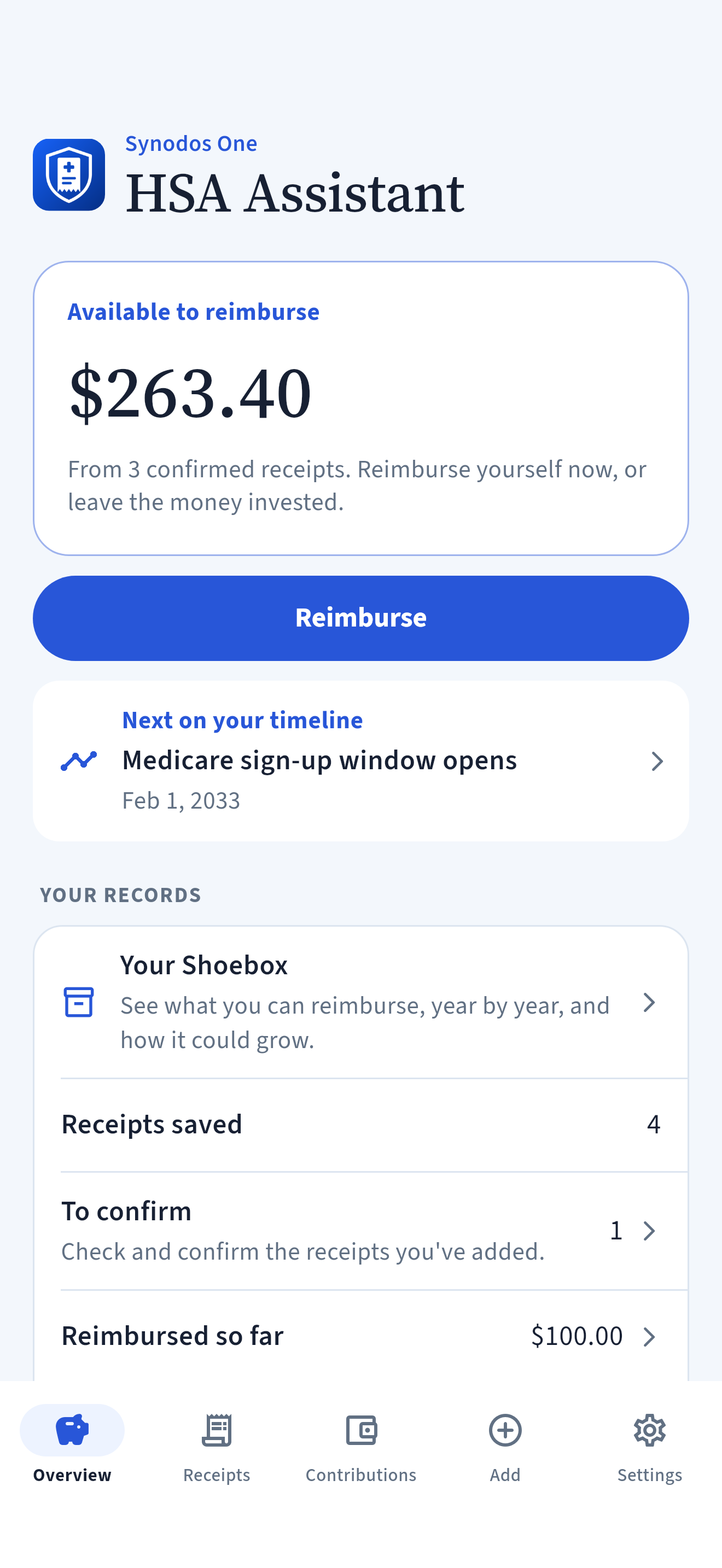
HSA Assistant Overview screen in light appearance: $263.40 available to reimburse from 3 confirmed receipts, a Reimburse button, the next date on your timeline and a summary of your records
iPhone Development Preview · Fictional Test Data
Why Keep Your Receipts?

The Receipts
Are the Record.

An HSA can save you taxes three ways. Money goes in before tax. It can be invested, and its growth isn’t taxed. And it comes out tax-free when you use it for qualified medical expenses. These are the medical, dental and vision costs the IRS allows, such as doctor visits, prescriptions and glasses.

The Shoebox method. Pay medical bills yourself now, keep the receipts in your Shoebox, and leave your HSA invested. Later, even years later, you can reimburse yourself for those expenses, tax-free at any age. A reimbursement is money you take out of your HSA to cover a qualified medical expense you paid for yourself. In the meantime, the money in your HSA can grow.

The catch is proof. Under current IRS rules, there’s no deadline to reimburse yourself if the expense came after your HSA was opened, no one else (such as insurance) has repaid you, you haven’t deducted it on a tax return, and you keep the receipts. HSA Assistant keeps that proof for you.

Good to know. Investments can lose value, and nothing here is a promise of growth. Reimbursing yourself right away is fine too. California and New Jersey tax HSAs differently. This is general information, not tax advice. For details, see IRS Publication 969.

You decide which expenses qualify, when to reimburse yourself, and what to share.

How It Works

A Place for Every Receipt.
A Record You Can Trust.

01

Add a Receipt

Scan a paper receipt, or choose a photo or PDF. The app reads the provider, dates and amounts for you. Use an itemized receipt. It shows the provider, the patient, the date of service, what it was for and the amount. A card slip isn’t enough.

02

Confirm It

Check each detail against the receipt, choose how you paid, and confirm that the receipt is itemized and the expense qualifies. Nothing counts until you confirm it.

03

Reimburse Yourself

Enter the amount you took out of your HSA, and the app picks receipts that add up to it. You can also reimburse yourself for part of a receipt.

04

Keep a Copy

Make an encrypted backup with its own recovery code. At tax time, save a tax summary as a PDF.

One Household. Every Family Member.

Every Receipt.
Every Reimbursement.

Keep receipts for each family member, and see what you’ve reimbursed and what’s left.

  • Itemized Receipts for Each Person
  • Partial and Full Reimbursements
  • Contributions by Tax Year
  • Who Your Health Plan Covers, by Month
  • Key Dates on a Timeline
  • A Tax Summary PDF for IRS Form 8889
Inside the App

Plain Words.
Clear Totals.

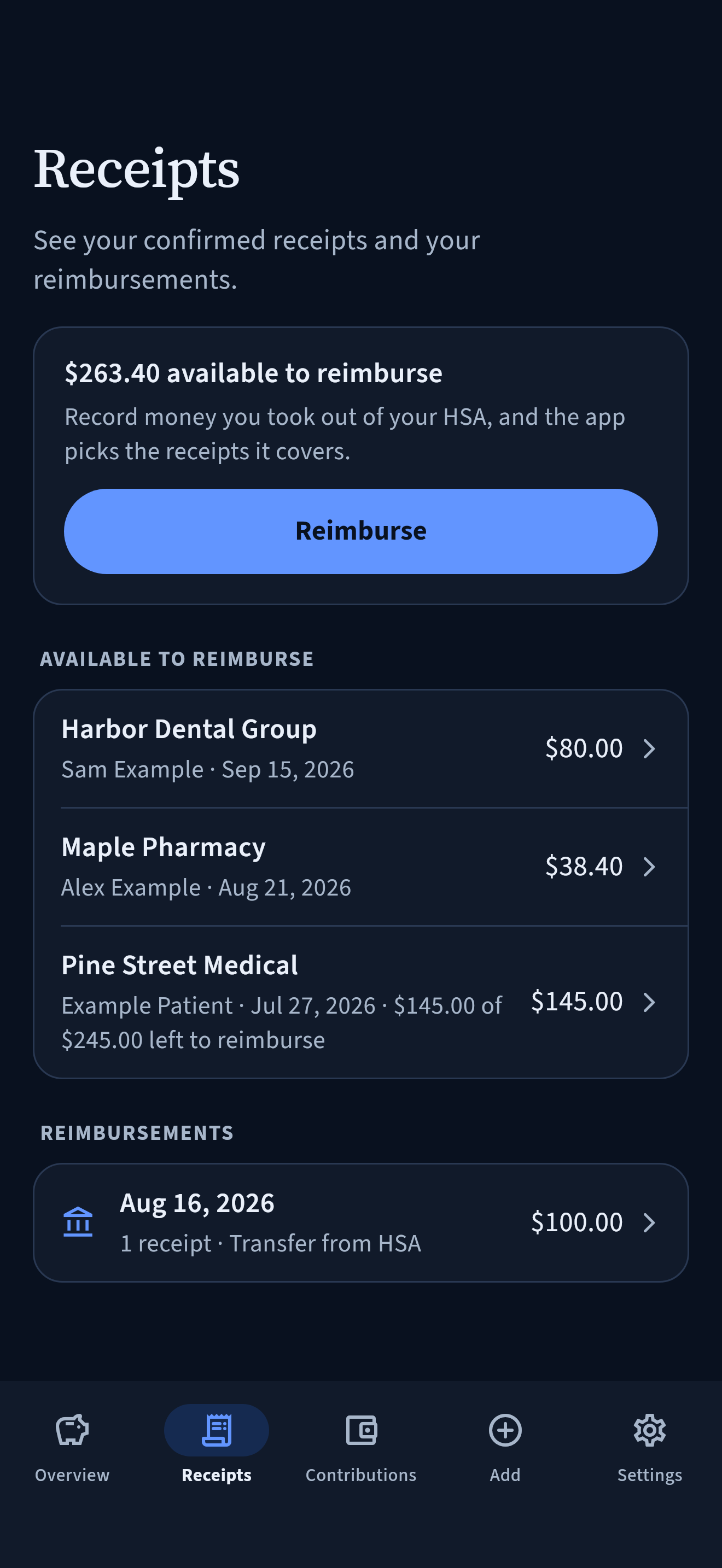
HSA Assistant Receipts screen in dark appearance: $263.40 available to reimburse, three confirmed receipts and one reimbursement
Your ReceiptsSee your confirmed receipts and your reimbursements.
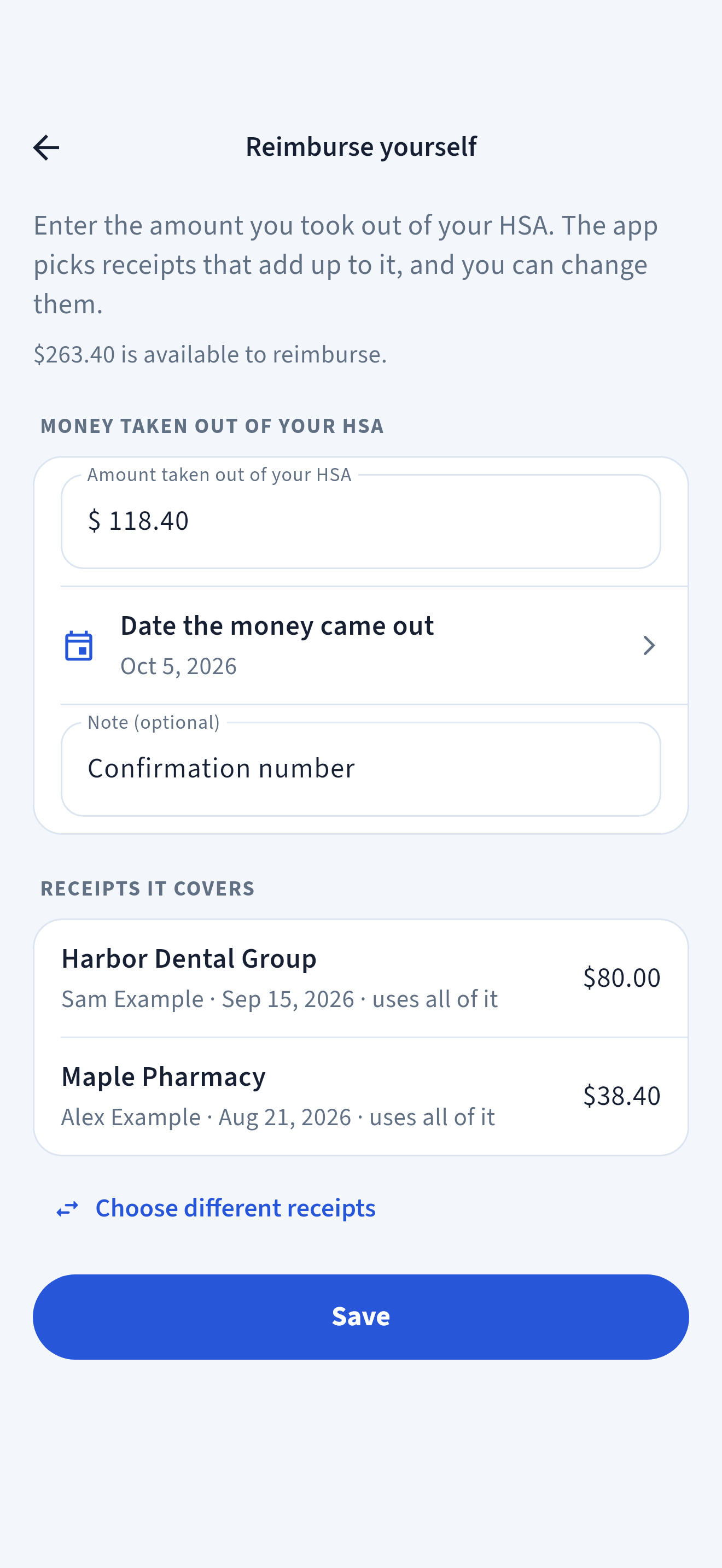
HSA Assistant Reimburse yourself screen in light appearance: enter the amount taken out of your HSA, the date and an optional note, such as a confirmation number
Reimburse YourselfEnter the amount you took out, and the app picks the receipts it covers.
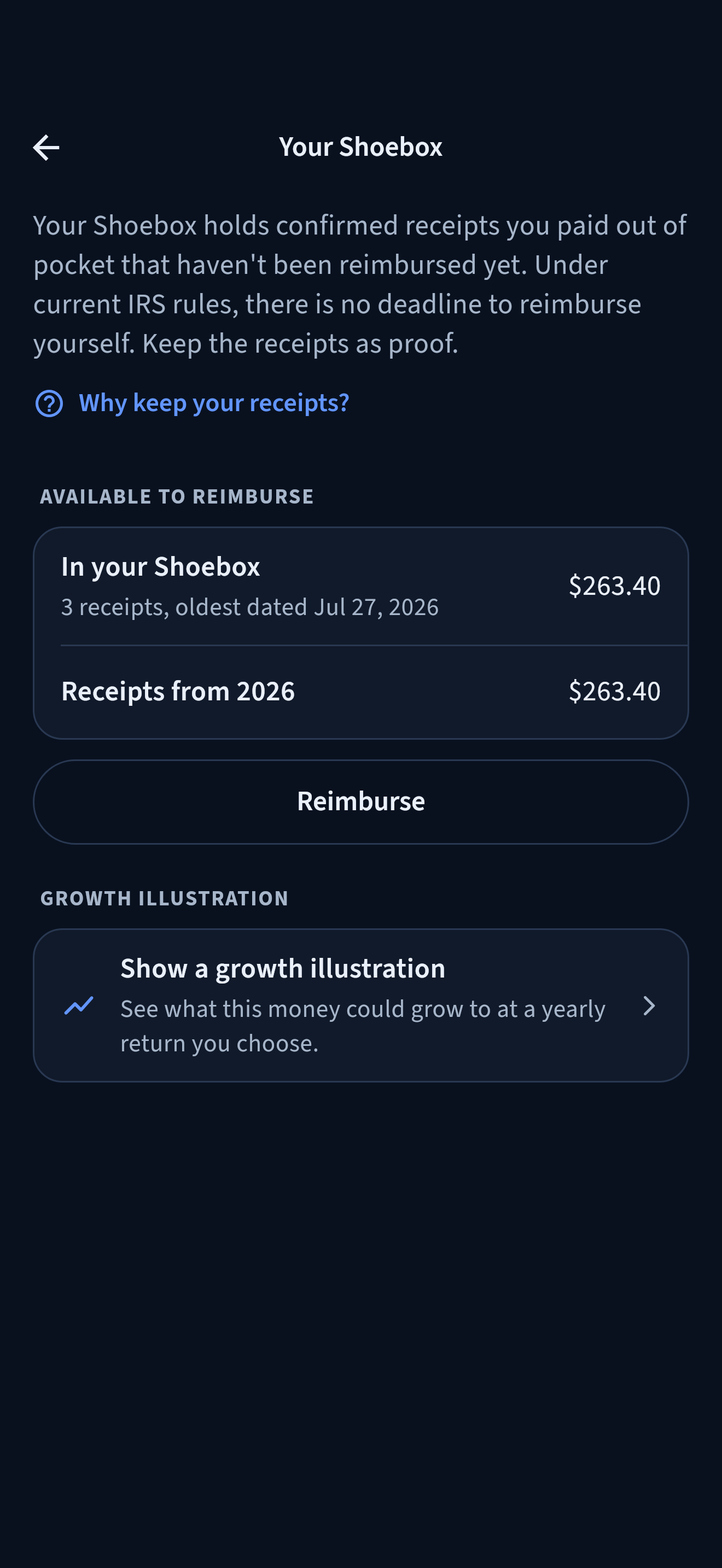
HSA Assistant Your Shoebox screen in dark appearance: $263.40 available to reimburse from 3 receipts, the oldest dated July 2026, and a growth illustration at a 7% yearly return you chose
Your ShoeboxSee what you can reimburse, year by year, and how it could grow.

Development screenshots use fictional test data and alternate between dark and light appearance. Screens may change before release.

Your Shoebox

Receipts Waiting.
Your HSA Can Keep Growing.

Your Shoebox holds confirmed receipts you paid out of pocket that haven’t been reimbursed yet. They’re grouped by year of service.

The ShoeboxAvailable to Reimburse

See the total you can reimburse today, and how much comes from each year.

  • Only confirmed receipts count
  • Reimbursements are subtracted automatically
  • A growth illustration at a yearly return you choose. It’s an illustration, not a forecast or investment advice.
ContributionsLeft to Contribute This Year

Record contributions through payroll, from you and from your employer. See what’s left under your contribution limit.

  • Organized by tax year
  • Includes the extra $1,000 a year from the year you turn 55
  • Limits follow IRS guidance for the years shown. This isn’t tax advice.
Tax Time

Your Figures.
From Your Records.

Create a yearly tax summary with the figures you may need for IRS Form 8889, taken from your own records. Compare them with Form 1099-SA from your HSA provider and with box 12 (code W) of your W-2.

  • Contributions, contribution limit and distributions for the year
  • Save or share the summary as a PDF
  • Review it before relying on or sharing it

The tax summary is a recordkeeping aid, not tax advice. Confirm figures with IRS Publication 969, your HSA provider, or a tax professional.

Your Timeline

The Dates
That Change the Rules.

See key dates for your HSA, based on your birth date.

01

From the year you turn 55, your contribution limit is $1,000 higher.

02

From age 65, money you take out for anything other than qualified medical expenses is no longer subject to the 20% additional tax. It is still taxed as income.

03

Add the month Medicare starts to see your limit for that year. You can’t contribute for that month or later.

Rules can change, and some depend on your circumstances. This isn’t tax advice.

Private by Design

Your Medical Receipts.
Your Control.

Your records are stored on your iPhone, encrypted. The app doesn’t send them to the Provider, and the Provider can’t access them through the app.

There’s no account to create, and the Provider runs no server or cloud service for your records. Receipts are read on your iPhone, not by an outside service.

Read the Privacy Policy
No Account Required
Records Encrypted on Your iPhone
Receipts Read on Your iPhone, Not Sent Anywhere
No Advertising, Analytics or Tracking
Encrypted Backups With a Recovery Code
You Choose When and Where to Share
Common Questions

A Few Things
to Know.

Practical answers about the app and your records.

Is the App Available to Download?

Not yet. HSA Assistant is in development and isn’t publicly available. This site will be updated when release information is ready.

Do I Need an Account?

No. There’s no account to create and no sign-in. Your records are stored on your iPhone, encrypted.

Does It Connect to My HSA Provider or Bank?

No. The app doesn’t connect to your HSA provider or bank, and it doesn’t move money or file taxes. You record your contributions and reimbursements yourself.

Does the App Decide Whether an Expense Qualifies?

No. You decide, and the app keeps your answer with the receipt. IRS Publication 502 explains which medical expenses qualify. This isn’t tax advice.

Is There a Deadline to Reimburse Myself?

Under current IRS rules, there’s no deadline to reimburse yourself if the expense came after your HSA was opened, no one else (such as insurance) has repaid you, you haven’t deducted it on a tax return, and you keep the receipts. See IRS Publication 969. This isn’t tax advice.

What Happens if I Lose My iPhone?

Make an HSA Assistant backup and save it somewhere other than your iPhone, such as iCloud Drive or a computer. To restore it, you need the file and its recovery code. An iCloud or computer backup of your iPhone won’t restore your records on its own.

How Does the Subscription Work?

Adding new records requires a yearly subscription through Apple: 2 weeks free for new subscribers, then $19.99 per year. It renews each year until you cancel it in your Apple Account settings. One subscription covers your Apple Family Sharing group. You can always view and export your saved records, with or without a subscription.

Is It Only for iPhone?

Yes. HSA Assistant is built for iPhone.

Is This Tax Advice?

No. HSA Assistant is a recordkeeping tool. Contribution limits, key dates and tax summary figures are for your records. Confirm them with IRS Publications 969 and 502, your HSA provider, or a tax professional.

Availability

Built for iPhone.
In Development.

HSA Assistant isn’t publicly available yet. We’ll share availability here when it’s ready.

2 weeks free, then $19.99 per year. One subscription covers your Family Sharing group.

Contact Us About the App
Contact

Questions? We’re Here.

App Inquirieshsa-inquiries@synodospath.com

Questions about HSA Assistant and its availability.

App Supporthsa-support@synodospath.com

Help with the app or feedback from testing.

Email is separate from the app’s records. Share only what your question needs, and please leave out receipts and other medical documents.